






Social media has become the world’s largest focus group. Every day, millions of customers share opinions, complaints, questions, and praise about brands on Twitter, Facebook, LinkedIn, Instagram, TikTok, and Reddit.
These conversations happen whether a company listens or not. A customer who receives poor service might tweet about it, reaching thousands of followers. A delighted user might post a photo of their new purchase, generating organic referrals.
Ignoring these conversations is not an option for customer centric organizations.
Social media monitoring (also called social listening) is the process of tracking online conversations about your brand, products, competitors, and industry. Unlike surveys or focus groups, social media data is unsolicited and authentic.
Customers do not know they are being watched, so their behavior is natural. This makes social monitoring one of the richest sources of customer insight available.
The Shift from Broadcasting to Listening
Traditional social media management focused on broadcasting: pushing out promotional content, responding to direct mentions, and measuring likes and shares. This is one way communication.
Social monitoring flips the model. It starts with listening to what customers are saying about you, whether they tagged you or not.
A customer might complain about your product without using your @handle. A fan might recommend you without linking your page. Monitoring captures these untagged mentions.
For CRM, this listening capability closes a critical gap. The CRM knows what a customer bought, when they called support, and which emails they opened. But it does not know what the customer said about you on social media last night.
Integrating social monitoring with CRM brings the voice of the customer into the system of record, enabling a 360 degree view.
What Social Monitoring Captures
Effective social monitoring captures several layers of data:
- Brand mentions: Any post that includes your brand name, product name, or common misspellings. Includes both tagged and untagged mentions.
- Sentiment: Whether the mention is positive, negative, or neutral. Advanced tools detect sarcasm and intensity.
- Influencers: Users with large followings or high engagement who mention your brand. They can amplify or damage your reputation.
- Emerging trends: Topics, keywords, or hashtags that are suddenly appearing more frequently. Early detection allows proactive response.
- Competitor mentions: What customers are saying about your competitors. Identifies gaps and opportunities.
- Industry conversations: Broader discussions relevant to your market, even if your brand is not mentioned.
The Cost of Not Monitoring
Companies that do not monitor social media suffer predictable consequences. A customer complaint goes viral because no one responded for 24 hours.
A product defect is discussed in a private Facebook group for weeks before the company notices. A competitor launches a successful campaign, and the company learns about it from a sales rep’s casual remark, not from data.
These information asymmetries put the company at a disadvantage. Without social monitoring, you are flying blind.
Integrating Social Monitoring with CRM
Modern social monitoring tools like Sprout Social, Brand24, Mention, and Talkwalker integrate with CRM platforms via API. When a mention is detected, the tool creates an activity or case in the CRM.
A negative mention from a high value customer triggers a task for customer success. A positive mention from an influencer triggers a sales outreach.
A frequently mentioned product issue creates a knowledge base article. Integration turns listening into action, closing the loop between social data and business processes.
Selecting the Right Tool
Selecting the right social monitoring tool depends on business size, budget, channels, and CRM platform.
Social media management platforms (Hootsuite, Sprout Social, Buffer) offer monitoring alongside publishing and analytics. Best for marketing teams needing an all in one solution.
Dedicated listening tools (Brand24, Mention, Talkwalker) focus on depth of monitoring, advanced filters, sentiment analysis, and trend detection. Best for customer insights and competitive intelligence.
Enterprise platforms (Sprinklr, Brandwatch, Salesforce Social Studio) offer massive scale, AI customization, and deep CRM integration. Best for large organizations with high volumes.
Sprout Social
Sprout Social combines publishing, engagement, and monitoring. Key features include keyword tracking across Twitter, Facebook, Instagram, LinkedIn, and Reddit. It offers sentiment analysis, a unified inbox, and reporting on share of voice and top influencers.
Pricing starts at approximately $249 per user per month. CRM integrations include Salesforce, HubSpot, and Microsoft Dynamics. A negative mention can automatically create a support case.
Brand24
Brand24 is a dedicated listening tool with real time capabilities. It tracks mentions from news, blogs, forums, Twitter, YouTube, Instagram, Facebook, and TikTok.
Features include AI powered sentiment analysis, reach metrics, influencer scoring, and real time alerts. Pricing starts at approximately $49 per month.
CRM integration via Zapier or API is common. A spike in negative sentiment can create a task in the CRM for immediate follow up.
Mention
Mention focuses on real time web and social monitoring. It covers over one billion sources including Twitter, Facebook, Instagram, Reddit, forums, and news sites.
Features include language detection, email alerts, competitor tracking, and basic sentiment analysis. Pricing starts at approximately $29 per month.
CRM integration via Zapier, Make, or direct API allows pushing mentions as lead activities or support cases, keeping all data in one place.
Talkwalker and Sprinklr
Talkwalker is an enterprise grade listening tool with advanced AI, image recognition, support for over fifty languages, and predictive analytics. Pricing is quote based, typically above $10,000 per year. CRM integrations include Salesforce and Microsoft Dynamics.
Sprinklr is a full customer experience platform for large enterprises. It monitors social media, review sites, news, blogs, and forums.
Features include AI powered sentiment and intent detection, automated case creation, and workflow routing. Pricing is enterprise level, often six figures annually. A negative mention from a VIP customer can be escalated to a priority case with a fifteen minute SLA.
CRM Integration Patterns
Three common integration patterns exist for connecting social monitoring to your CRM.
Inbound case creation: A negative mention creates a support case in the CRM. The agent sees the original post and can reply from within the CRM interface.
Activity logging: Every mention is logged as an activity on the contact or account record. Sales reps see that a prospect mentioned the brand positively, giving them conversation starters.
Alerting and scoring: The tool updates a social sentiment score field on the customer record. When the score drops below a threshold, the CRM triggers an alert for the account team.
Key Metrics for Social Monitoring
Volume metrics measure how often your brand is mentioned. A sudden spike indicates an event, positive or negative. Mentions by channel help allocate response resources appropriately.
Sentiment metrics capture the emotional tone of conversations. Modern tools score each mention from -1 (very negative) to +1 (very positive). Average sentiment should be tracked weekly.
A declining score is an early warning of customer dissatisfaction. Reach and influence metrics recognize that not all mentions are equal.
Potential reach is the sum of followers of all users who mentioned your brand. High reach with negative sentiment signals a potential crisis that needs immediate attention.
Share of voice compares your brand’s mention volume to competitors. Increasing share of voice indicates growing mindshare in your market category.
Using Metrics Inside the CRM
Store a contact level sentiment score for any customer with social mentions. Average their sentiment over the last thirty days. A declining score triggers a customer success task automatically.
Set up case creation rules so that mentions with negative sentiment and high reach automatically create a high priority support case with the original post link attached.
Add a lead scoring boost for prospects who mention your brand positively. Award a ten point boost and log the mention activity on their contact record.
Include social sentiment as one component of an account health score, alongside support ticket volume and payment history. This gives a complete picture of customer health.
Building an Action Oriented Dashboard
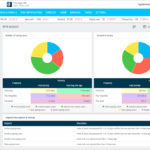
A social monitoring dashboard should answer three questions: What is happening? What needs my attention now? What has changed over time?
The top section should show alerts and a priority queue with mentions requiring immediate action: negative sentiment with high reach, influencer mentions, or repeated complaints from the same customer. Each alert includes a respond button.
Include sentiment and volume trend lines over the last thirty days. Annotate with major events like product launches or PR incidents. A spike in volume with a drop in sentiment is a clear crisis indicator.
List top influencers and top complaints with the most common negative keywords. Add a share of voice comparison against up to three competitors.
Finally, include a response SLA tracker showing the percentage of negative mentions responded to within the target time, such as one hour. The dashboard should be embedded in the CRM or accessible via a link.
Integrating with Customer Service Workflows
The most common mistake is treating social monitoring as a marketing function. The majority of social mentions that require action are customer service issues that need fast resolution.
Set up automatic case creation when a mention meets criteria like negative sentiment plus brand mention plus certain keywords. The case is assigned to a queue based on topic: billing, technical, or shipping.
Allow agent reply from within the CRM. The agent responds directly from the CRM case page, and the reply posts to the social network via API. The case log records the entire interaction.
When the agent resolves the issue, the CRM can optionally post a public follow up, such as “glad we could help.” This shows other customers that the brand responds effectively to problems.
For VIP customers, if the social mention comes from a customer with high lifetime value, the case priority is automatically set to high, and a manager is notified immediately.
Common Pitfalls to Avoid
Avoid responding only to direct @mentions. Most complaints are untagged. Monitor keywords, not just handles, to catch everything.
Do not use automated, robotic replies. A generic “we’re sorry for your inconvenience” repeated often damages the brand. Personalize responses using the CRM to pull customer name and purchase history.
Do not ignore positive mentions. Responding with a simple thank you encourages more advocacy and strengthens customer relationships.
Establish an escalation path for after hours. Set up an on call rotation or use chatbots for basic responses during off hours so no customer is left waiting.
Monitoring conversations on social media transforms unstructured public chatter into structured, actionable intelligence inside the CRM. The right tools capture mentions across channels, apply sentiment analysis, and integrate with CRM workflows.
Key metrics like volume, sentiment, reach, and share of voice drive prioritization and measurement. An action oriented dashboard alerts teams to crises, complaints, and opportunities.
Integration with customer service turns social mentions into cases that are tracked, resolved, and closed. This creates a closed loop system for continuous improvement.
Organizations that master social monitoring stop being surprised by customer sentiment and start proactively shaping it, one tweet, post, and comment at a time, building stronger relationships with every interaction.