







Most CRM users are familiar with external SLAs, the commitments a company makes to its customers about response times, resolution targets, and service availability.
A customer expects a reply within four hours. A premium support ticket must be resolved in twenty four hours. These external SLAs are tracked religiously because they directly affect customer satisfaction and retention.
But internal SLAs, agreements between departments, are rarely defined, let alone enforced. Marketing promises to deliver qualified leads to sales within twenty four hours.
Sales promises to follow up on those leads within forty eight hours. Support promises to escalate technical issues to engineering within one hour.
These internal handoffs have no formal deadlines, no tracking, and no accountability. The result is broken processes, frustrated employees, and ultimately, unhappy customers.
What Are Internal SLAs?
An internal SLA is a measurable commitment between two or more internal teams about the timeliness and quality of a handoff or joint activity.
Examples include marketing to sales: qualified leads will be assigned to a sales rep within four hours of scoring.
Sales to support: critical customer issues will be escalated with a full context summary within thirty minutes.
Support to product: bug reports will be triaged and assigned to an engineer within two business days.
Sales to finance: discount approval requests will be reviewed within one hour during business hours.
Procurement to sales: supplier lead time updates will be communicated within twenty four hours of receipt.
Without internal SLAs, work languishes in queues. A sales rep waiting for a discount approval may lose a deal.
A support agent waiting for engineering input may leave a customer on hold. These delays are invisible to traditional CRM dashboards.
Why Collaborative CRM Is the Right Tool
Collaborative CRM provides shared records, task assignment, notifications, and escalation workflows. These features are exactly what internal SLAs need.
Instead of separate spreadsheets or email chains, internal SLAs are encoded as rules in the CRM. When a task is assigned from one team to another, the CRM starts an internal SLA timer.
If the deadline approaches without action, the system sends reminders. If the deadline passes, the system escalates to the next level of management.
The same infrastructure that tracks customer response times can track internal handoff times. The difference is the stakeholder: the customer is an internal team, and the service is a cross departmental action.
The Cost of No Internal SLAs
Organizations without internal SLAs suffer from invisible friction. A marketing lead sits in a queue for three days before sales notices.
A discount request waits through a weekend because no one defined weekend coverage. A bug report submitted by support to engineering is never acknowledged, and the customer churns.
Each of these failures is a failure of internal process, not of individual effort. Internal SLAs bring visibility.
When every handoff has a deadline and an owner, delays become visible. Managers can see which teams consistently miss internal SLAs and address root causes like understaffing, poor tools, or unclear processes.
Types of Internal SLAs in CRM
Lead handoff SLA measures time from lead qualification to assignment to a sales rep.
Lead response SLA measures time from assignment to first outbound contact.
Case escalation SLA measures time from support ticket creation to engineering notification for a bug.
Approval SLA measures time from request submission to approval or rejection for discounts, contracts, or marketing content.
Task completion SLA measures time from task creation to completion for cross functional tasks like legal reviewing an NDA.
Status update SLA measures time from a request for information to the provision of that information.
Defining Internal SLA Rules
Internal SLAs are only useful if they are explicit, measurable, and enforced. A vague agreement like “marketing will hand off leads quickly” cannot be tracked.
A specific SLA like “qualified leads will be assigned to a sales rep within four hours of scoring” can be automated.
Collaborative CRM provides the infrastructure to define these rules, monitor compliance, and trigger actions when deadlines are missed.
Each internal SLA rule consists of several components. The trigger event starts the timer. The target duration specifies how much time is allowed.
Business hours define whether the clock runs 24/7 or only during working hours. Breach action determines what happens if the SLA is not met.
Pause conditions specify whether the timer stops under certain circumstances, such as waiting for additional information.
Measuring Internal SLA Performance
Once rules are defined, the CRM automatically tracks each instance. For every SLA rule, the system records SLA start time, time to completion, SLA status, and breach reason.
Standard reports show SLA adherence rate by team, average time to complete by SLA type, breach distribution by assignee or team, and trends over time.
These reports are visible to team leads and managers, not as punishment but as diagnostic tools. A team consistently missing SLAs may need more headcount, better tools, or process simplification.
Enforcement Through Automation
Enforcement does not mean punishment. It means ensuring that missed SLAs do not go unnoticed.
Automated enforcement actions include reminders at fifty and eighty percent of SLA duration. The CRM sends an in app notification or email to the assignee.
Manager notification occurs if SLA is breached. The system notifies the assignee’s direct manager with details of the breach.
Reassignment can trigger for critical SLAs. A breach can automatically reassign the task to another qualified team member.
Escalation chain means if a breach is not resolved after a second threshold, the CRM escalates to a senior manager or executive.
These automations replace the need for managers to manually chase overdue tasks. The CRM becomes the persistent enforcer.
Example: Discount Approval SLA
A sales rep submits a discount approval request for a fifty thousand dollar deal. The internal SLA rule requires finance to approve or reject within two business hours during business hours.
The CRM records the submission time at 10:00 AM and sets the SLA deadline at 12:00 PM same day.
At 11:00 AM, fifty percent elapsed, the CRM sends a reminder to the finance team queue.
At 11:48 AM, eighty percent elapsed, the CRM sends a second reminder, this time copying the finance manager.
If no action by 12:00 PM, the SLA is breached. The CRM notifies the finance manager and the sales rep’s manager.
The approval request is also flagged as overdue on the finance dashboard. Finance approves at 12:30 PM. The CRM logs a thirty minute breach. The sales rep receives the approval and closes the deal.
Internal SLA for Lead Response
Another common internal SLA requires sales to contact a qualified lead within four hours. The CRM assigns the lead to a rep at 9:00 AM with an SLA deadline at 1:00 PM.
The rep logs a call at 12:45 PM, within SLA. The CRM marks SLA met.
If the rep had not logged contact by 1:00 PM, the CRM would have notified the rep’s manager and reassigned the lead to another rep at 1:15 PM.
Handling Exceptions and Pauses
Not all SLA failures are failures. An assignee may be on sick leave. A task may require information from an external party.
The CRM allows authorized managers to pause or adjust SLAs with a comment explaining the reason. Paused time does not count toward the SLA.
All pauses and adjustments are logged for audit. This ensures fairness and transparency.
Choosing Internal SLA Priorities
Not every handoff needs an SLA. Focus on handoffs that directly affect customer experience, approvals that block revenue, tasks that frequently cause delays, and processes where timing is critical.
Start with three to five internal SLAs. Prove value, then expand.
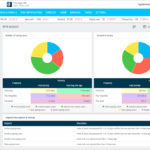
Internal SLA Dashboards for Different Roles
The individual contributor view shows each employee their own SLA performance. A sales rep sees a widget with adherence percentage and a list of open tasks with remaining time.
Red, yellow, and green color coding draws attention to at risk items. The team leader view shows aggregate performance, a bar chart by team member, and a leaderboard for positive gamification.
The executive view shows high level trends across multiple teams, with drill down by SLA type. Executives see which internal processes are the biggest bottlenecks.
Root Cause Analysis
When an SLA breach occurs, the CRM should help answer why. Root cause analysis starts with structured data capture.
For each breached SLA, the system prompts the responsible person to select a breach reason from a dropdown: capacity, missing information, technical issue, out of office, priority conflict, process unclear, or other.
Aggregated breach reasons become actionable insights. A dashboard showing that many discount approval breaches were due to capacity indicates the finance team may need more headcount or a streamlined approval process.
Correlation with Business Outcomes
Internal SLA breaches are not just process failures; they predict customer outcomes. Collaborative CRM can correlate internal SLA performance with external metrics.
Deals where discount approval SLA was breached are less likely to close. Cases where bug escalation SLA was breached have lower customer satisfaction.
Leads that experience SLA breach in sales response have much lower conversion rates. These correlations build the business case for improving internal SLAs.
Continuous Improvement Cycles
Internal SLAs should evolve. A quarterly review process, informed by CRM data, adjusts SLA targets and rules.
Review performance, analyze breaches, adjust targets, update automation rules, and communicate changes.
If a team consistently achieves high adherence on a four hour SLA, consider tightening to two hours. If another team consistently misses a two hour SLA, consider lengthening to three hours or adding headcount.
Internal SLAs for Remote Teams
Remote work eliminates the informal cues that once signaled urgency. Internal SLAs provide the structure that remote teams need.
Time zone awareness means the CRM stores each employee’s time zone and working hours. An approval request sent to a New York manager at 6 PM ET starts its SLA clock the next business day at 9 AM ET.
Follow the sun workflows automatically reassign unresolved escalations from the US team to the APAC team at the end of the US business day. The SLA clock continues, but the work shifts across time zones.
Building a Culture of Accountability
Internal SLAs fail when employees perceive them as surveillance. Success requires a culture where SLAs are seen as mutual commitments that enable everyone to succeed.
Transparency first means all internal SLA definitions and performance data should be visible to all employees, not just managers.
Blame free breach analysis focuses on process, not people. The question is “Why did this happen?” not “Who is at fault?”
Positive reinforcement celebrates SLA achievements with monthly awards and recognition. Regular SLA calibration meetings empower employees to shape the rules they are held to.
Internal SLAs transform collaborative CRM from a passive data repository into an active process engine. They bring visibility to cross departmental handoffs that were previously invisible.
They automate reminders and escalations, replacing manual chasing. They provide data for root cause analysis and continuous improvement.
When implemented with care, time zone aware, integrated with project tools, and embedded in a blameless culture, internal SLAs improve both operational efficiency and employee morale.
The ultimate beneficiaries are customers, who no longer suffer from delays caused by internal friction.
Organizations that master internal SLAs stop asking “Who dropped the ball?” and start knowing, with certainty, that the ball will be caught on time.